

Quickstart Guide
Existing Engrain integration partner?
Reach out to [email protected] for access, troubleshooting and permissions issues.
Not an Engrain integration partner?
Reach out to [email protected] to get up and running.
Step 1 — Locate a routing-enabled Unit Map
To calculate routes, you must first identify a Unit Map that has been processed for pathfinding. You will use the ID of this Unit Map for subsequent API calls.
1a) Fetch available maps
Query the List Unit Maps endpoint. We recommend filtering by your asset_id to narrow the results.
HTTP
Method: GET
Resource: List Unit Maps (https://api.unitmap.com/v1/maps)
Example:
curl --location 'https://api.unitmap.com/v1/maps?asset=7778&per-page=10000' \ --header 'API-Key: {YOUR API KEY}'
1b) Filter for Pathfinding data
An asset may contain multiple Unit Maps (e.g., different floor plates or stylistic variations). Only maps containing the "pathfinding" tag are compatible with the routing engine.
Scan the response for the object where the tags array includes "pathfinding".
Example:
{
"id": "50786",
"asset_id": "7778",
"name": "[UNIT MAP GRAPH] The Milo (Garden) C+",
"tags": [
"pathfinding"
],
"url": "https://cdn.sightmap.com/assets/.../map.umap",
"geojson_url": "https://cdn.sightmap.com/assets/.../map.geojson"
}
IMPORTANT
Store the id (e.g., "50786"). You will need this to fetch map locations and to calculate the Distance Matrix in the next steps.
Step 2 — Call Locations to fetch routable points
Goal: Retrieve all valid route endpoints (units/amenities/etc.) and the metadata required to reference them later.
HTTP
Method: GET
Resource: UnitMaps → Locations
Path (pattern): .../unitmaps/{unitMapId}/locations
https://api.unitmap.com/v1/openapi#tag/mapslocations/operation/listLocationsOnMap
Example Response Snippet:
JSON
"id": "18558",
"asset_id": "7778",
"unit_map_id": "50786",
"name": "Pool",
"x": 376.32,
"y": 524.15,
"floors": [
  {
    "id": "32787"
  }
],
"tags": [
  {
    "key": "engrain:amenity",
    "value": "yes",
    "created_at": "2026-02-25T21:09:26+00:00",
    "updated_at": "2026-02-25T21:09:26+00:00"
  },
  {
    "key": "leisure",
    "value": "swimming_pool",
    "created_at": "2026-02-25T21:09:26+00:00",
    "updated_at": "2026-02-25T21:09:26+00:00"
  }
Common query parameters
perPage: Increase page size to avoid pagination during ingestion/testing.
- Example:
perPage=10000
What you get back
- A list of locations on that UnitMap (units, amenities, gates, etc.)
- Each location includes identifiers you will reuse in the distance request (IDs, names, floor references, etc.)
Tip for consumers
- Store (cache) the locations response keyed by
unitMapIdand refresh when the map changes. That way you don’t need to refetch locations every time a user asks for a distance.
Step 3 — Select your source and target locations
Pick:
A source (start point)
One or more targets (end point(s))
Important field naming detail:
The distance request expects a floorIdfield (singular).
The Locations response may include a differently named field (the demo calls out “floors ID” vs. floorId). When you map the object from Locations → Distance Matrix request, ensure you provide:
- ✅
floorId - not
floorsId/floorIds/ other variants
Step 4 — Call Distance Matrix to Calculate distance and time between points.
HTTP
Method: POST
Resource: UnitMaps → Distance Matrix
Path (pattern): .../unitmaps/{unitMapId}/distance-matrix
https://api.unitmap.com/v1/openapi#tag/maps/operation/calculateDistanceMatrixForMap
Request body structure
sources: array of one or more starting points
targets: array of one or more ending points
You can submit multiple sources and multiple targets in the same request and receive a matrix of results.
Limit
- Up to 50 combined pairs per request (“up to 50 at a time in combination between targets and starts”).
- Practically,
len(sources) * len(targets) ≤ 50
- Practically,
Example request (1 source → 1 target)
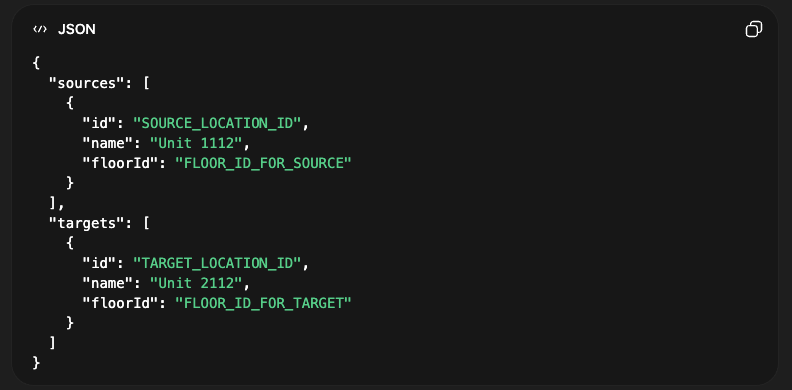
The exact fields per location (beyond id, name, floorId) should match what your API reference requires. The key point is: use real location objects derived from the Locations call, and ensure floorId is present.
Example response (conceptual)
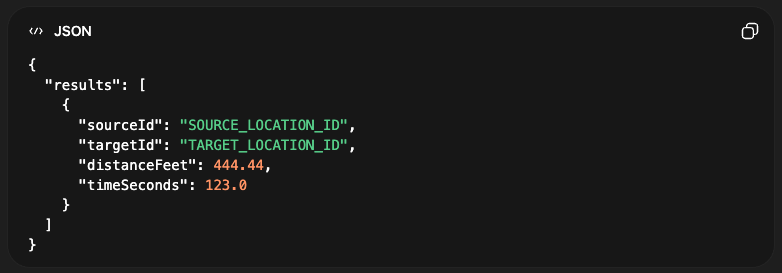
Units
- Distance is returned in feet
- Time is returned in seconds
Updated 8 months ago